
Python was designed by Guido van Rossum in 1990 as a replacement of ABC language. It provides efficient and advanced data structures which make it become a simple and efficient object-oriented programming language. With the continuous updates of versions and the addition of new language features, it is gradually being used for the development of independent and large-scale projects.
Python is an interpreted language. Differ from the complied language like C, C++, and Java, it is one where the instructions are not directly executed by the target machine, but instead, read and executed by interpreter. Because of the interpreter, python is more flexible but sometimes it’s not fast enough.
Python is open source and the installation can be found on: https://www.python.org. After the installation, let’s write our first python script. In our console, if we type “python” or “python3”, the python editor will be started. Some information including the version will be printed on the console as follow:
Python 3.11.2 (main, Feb 16 2023, 02:55:59) [Clang 14.0.0 (clang-1400.0.29.202)] on darwin
Type "help", "copyright", "credits" or "license" for more information.
Similar to many other programming language, the first program always starts from printing “Hello world”. In python, we can simply type:
print("Hello world")We will notice that the sentence “Hello world” is covered by double quote. That’s because “Hello world” is a string and when it got printed, it needs to be quoted. In python, the basic data types are: int, float, complex, string, boolean, list, tuple, dictionary, and set. And we can simply use print() function to display the contents to the screen.
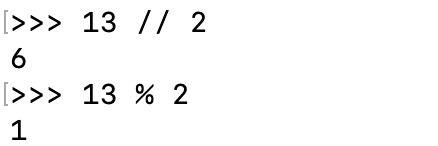
Python also provides several arithmetical operators: +, -, *, /, **, //, %. The operators +, -, *, / work exactly as them in mathematics. In python, “**” stands for square, “//” stands for integer division, and “%” stands for remainder. For example, 13 // 2 will get 6, and 13 % 2 will get 1.
Python uses the PEMDAS order of operations (Parentheses, Exponents, Multiplication/Division, Addition/Subtraction). It’s always a good idea to use parentheses when evaluating fractions.
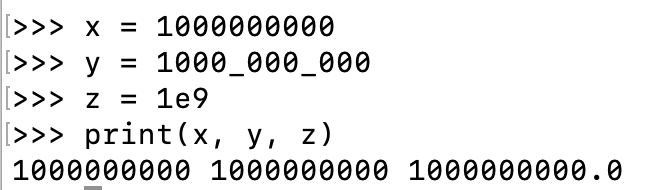
A small note on big numbers: python allows us to use underscore(_) to separate a big number and scientific notations to represent a big number. For example:
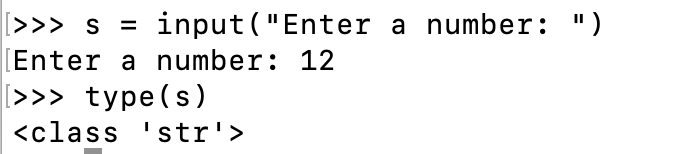
Getting input from user can be complicated in other languages. But in python, we can simply use the function input(). We can also type a prompt inside the parenthesis with a quote. However, the input that we get from user is in string type. If we want to apply arithmetics on it, we need to convert it into either int or float. For example:
When talking about strin gin python, we can actually do something interesting operations on it. For example, we can “add” (concatenate) strings and “multiply” (duplicate) strings.
>>> s1 = "hello "
>>> s2 = "world"
>>> s3 = s1 + s2
>>> print(s3)
hello world
By using the operator “+”, we can combine multiple strings into a single string. On the other hand, we can also duplicate a string multiple times using “*”.
>>> s4 = "hello" * 5
>>> print(s4)
hellohellohellohellohello
Another improtant operation on string is called “string formatting”. It’s used when the string output is based on some variable or when we don’t want to hardcode the output. There are several ways of string formatting, but I woulld prefer these two:
# string formatting 1:
>>> day = "Thursday"
>>> weather = "cold"
>>> print("The weather on {} is {}.".format(day, weather))
The weather on Thursday is cold.

# string formatting 2:
>>> print(f"The weather on {day} is {weather}.")
The weather on Thursday is cold.
In python, there are more than 1 way to define a string. But it is worth noting that there is no datatype “char” in python, even though there is only 1 character in the string. That is different in other programming language, which uses single quote to define a character and double quote to define a string. In python, a string is defined using no matter single quote (‘), double quote (“), or even triple quote (“””). But if we want to use quotation marks inside a string, the inner quotes and outer quotes need to be different.
# different ways of defining strings
>>> type("string")
<class 'str'>
>>> type('string')
<class 'str'>
>>> type("""string""")
<class 'str'>

# quotation inside a string
>>> print("""He said "hello" before meeting his friends""")
He said "hello" before meeting his friends
Small note on strings: we can split a string into a list of smaller strings using split() function. Inside the split() fucntion, if no argument is given, the string will be splited by white space; otherwise, the string will be splited by the character that is given. The given argument will not be included in the list of small strings.
# no argument is given
>>> print("hello world, this is python demo".split())
['hello', 'world,', 'this', 'is', 'python', 'demo']

# some arguments are given
>>> print("hello world, this is python demo".split("o"))
['hell', ' w', 'rld, this is pyth', 'n dem', '']
>>> print("hello world, this is python demo".split(","))
['hello world', ' this is python demo']